
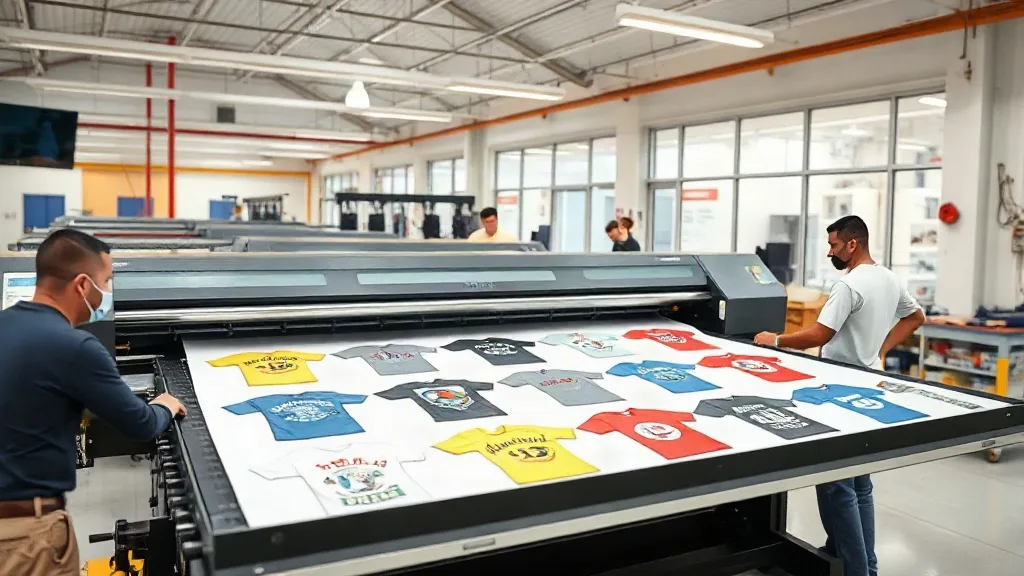
If you're in the custom apparel business, you know that time is money. Every minute spent on setup and cutting eats into your profits. That's where DTF Gangsheet comes in. This powerful tool lets you print multiple designs on a single sheet, slashing production time and costs. In this guide, we'll dive deep into what DTF gangsheets are, how they work, and why they should be a staple in your print shop.
What is a DTF Gangsheet?
A DTF gangsheet is a large sheet of transfer film that contains multiple DTF (Direct to Film) prints arranged together. Instead of printing each design individually, you gang them up on one sheet, hence the name. This method is incredibly efficient for print shops that handle a variety of small to medium-sized orders.
DTF printing itself involves printing your design onto a special film, applying adhesive powder, and then heat-pressing it onto fabric. The gangsheet approach takes this a step further by maximizing the use of the film and printer time.
Why DTF Gangsheets Are a Game-Changer
Let's break down the benefits that make DTF gangsheets a must-have for any serious apparel decorator.
Cost Efficiency
By printing multiple designs on one sheet, you significantly reduce waste. The film and powder are used more efficiently, and you save on setup time. This translates to lower per-unit costs, which can boost your profit margins or allow you to offer competitive pricing.
Time Savings
Instead of loading and unloading the printer for each design, you print everything at once. The cutting process is also streamlined: you cut out each design from the sheet, but you're handling one sheet instead of many small prints. This can cut your production time by up to 50% or more, depending on your workflow.
Versatility
DTF gangsheets are perfect for small batch orders, personalized items, and sample packs. You can mix and match designs, sizes, and even colors on the same sheet. This flexibility is ideal for businesses that offer custom products or handle many small orders.
Consistency
When you print all designs at once, they go through the same printer settings and curing process, ensuring consistent quality across the board. No more variations in color or texture from one print to another.
How to Create a DTF Gangsheet
Creating a gangsheet requires some planning and the right tools. Here's a step-by-step overview:
- Design Preparation: Gather all the designs you want to include. Make sure they are in a high-resolution format (300 DPI is recommended). Arrange them on a canvas that matches the width of your DTF film (commonly 13", 17", or 24").
- Nesting: Use design software or a specialized gangsheet builder to nest the designs efficiently, minimizing empty space. Many RIP software programs have gangsheet features built-in.
- Printing: Load the film into your DTF printer and print the gangsheet. Ensure your printer is calibrated for the film type you're using.
- Powder Application: Apply adhesive powder evenly over the printed sheet, shake off excess, and cure it under heat.
- Cutting: Once cured, cut out each design. You can use a cutter plotter or scissors, depending on your volume.
- Pressing: Heat press each design onto the garment following the recommended temperature and time for your film and powder.
Best Practices for DTF Gangsheet Success
To get the most out of your gangsheets, keep these tips in mind:
- Plan Your Layout: Group designs by size and color to optimize space. Rotate designs if necessary to fit more.
- Leave Margins: Leave at least 0.25 inches between designs to avoid overlapping during cutting and to make cutting easier.
- Test Your Settings: Before printing a full sheet, do a small test print to ensure your printer settings are correct for the film and design.
- Use Quality Materials: Invest in good quality DTF film and powder. Cheap materials can lead to poor adhesion, cracking, or fading.
- Keep Records: Document your successful layouts and settings for future reference. This will save time and reduce errors.
Common Mistakes to Avoid
Even experienced printers can make mistakes with gangsheets. Here are some pitfalls to watch out for:
- Overcrowding: Trying to fit too many designs can lead to cutting errors and wasted film. Leave some breathing room.
- Inconsistent Powder Application: Too much or too little powder can cause adhesion issues. Use a powder shaker for even coverage.
- Improper Curing: Under-curing leads to wash-off; over-curing can yellow the design. Follow the powder manufacturer's guidelines.
- Ignoring Film Orientation: Some films have a printable side; printing on the wrong side will ruin the sheet.
DTF Gangsheet vs. Other Printing Methods
How does DTF gangsheet compare to screen printing, DTG, and vinyl? Each method has its strengths, but DTF gangsheets shine in specific scenarios.
Vs. Screen Printing
Screen printing is cost-effective for large orders of the same design, but setup costs are high. DTF gangsheets have no setup costs per design, making them ideal for small batches and multi-design orders.
Vs. DTG
DTG (Direct to Garment) is great for detailed designs on cotton, but it requires pre-treatment and can be slow. DTF gangsheets work on a wider range of fabrics, including polyester and blends, and offer faster production for multiple items.
Vs. Vinyl
Vinyl is durable but limited in color and detail. DTF gangsheets can reproduce full-color, photographic designs with gradients and fine details, making them more versatile.
Frequently Asked Questions
What is the maximum size for a DTF gangsheet?
The maximum size depends on your printer and film width. Common film widths are 13", 17", and 24", with lengths limited by your printer's capabilities and the roll size. Some printers can handle sheets up to 24" x 36" or longer.
Can I mix different designs on one gangsheet?
Absolutely! That's the main advantage. You can combine various designs, sizes, and colors on a single sheet, as long as they fit within the printable area.
How do I ensure accurate color reproduction on a gangsheet?
Use a color-managed workflow: calibrate your monitor, use ICC profiles for your printer and film, and perform regular nozzle checks and color tests. Also, ensure your design files are in CMYK mode if your printer requires it.
What fabrics can I use with DTF transfers?
DTF transfers work on a wide range of fabrics, including cotton, polyester, blends, and even some nylons. They adhere well to both light and dark colors.
How long does a DTF gangsheet last?
When stored properly in a cool, dry place away from direct sunlight, DTF transfers can last up to 6-12 months. Once pressed, the print durability depends on washing and wear, but typically lasts as long as the garment.
Mastering DTF gangsheets can revolutionize your print shop's efficiency and profitability. With the right approach, you'll be churning out high-quality custom apparel faster than ever. Start experimenting with your layouts and settings today, and watch your productivity soar.